
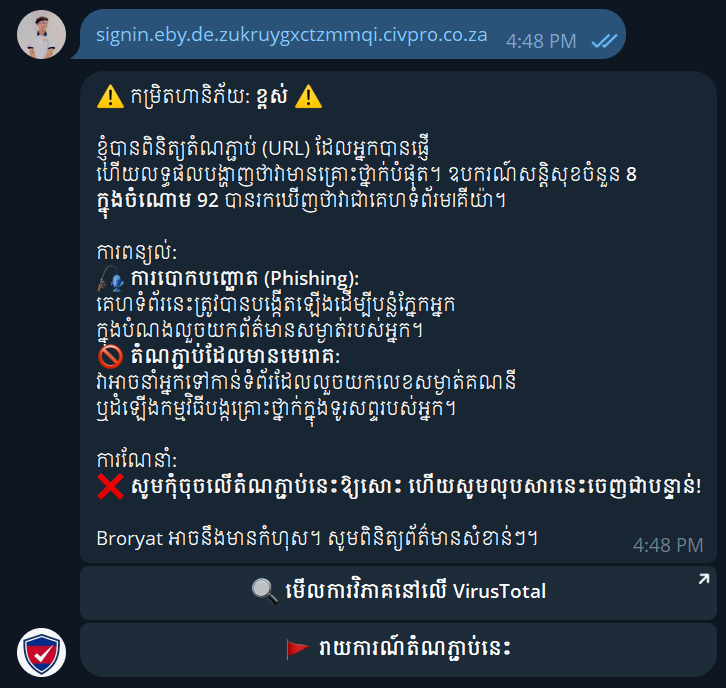
When you see a suspicious message in a private chat or group, you can forward it directly to Broryat and let the bot do the checking for you.
3 Simple Steps
No dashboard and no extra setup. Open Telegram and send the suspicious content to the bot.
01 — Find the official bot
Open Telegram and use the search bar at the top to look for @broryat_bot. Check the handle carefully — scammers often set up lookalike bots with an extra letter or number in the name. Tap the official result, then press Start to open the chat. You only need to do this once; after that the bot stays in your chat list for quick access.
02 — Send the suspicious content
Forward the message straight from the chat where you received it, paste a link as plain text, or attach the file directly. Do this without opening the link or file first. Forwarding keeps the original context — the sender, the link, and any attachment — so the bot can inspect exactly what you received. If the message only contains a link, copying the URL and sending it as text works just as well.
03 — Get the review back fast
Within a few seconds the bot replies with a clear risk level — safe, suspicious, or dangerous — along with a short reason and a practical next step. Use that to decide whether to ignore it, block the sender, or verify through a trusted channel. When you are unsure, always wait for the bot’s response before you tap anything.
Tip
Do not open the link or file before the bot responds. If someone claims a file is a resume or work document but it has an unusual extension, ask them to resend it as a normal PDF through a channel you trust.